If you are someone who wakes up and checks Google Search Console (GSC) every single morning to track clicks and rankings, brace yourself. Google is rolling out a major update that is absolutely critical to the future of webmastering and SEO.
Google has officially begun testing a brand-new reporting suite dedicated entirely to website performance within Google’s generative AI search features—specifically AI Overviews (formerly known as SGE) and AI Mode (the conversational interface where Google uses AI to serve direct answers on the search results page). For now, this live test is limited to a select group of website owners in the UK.
To put it simply: in the near future, we won’t just be obsessing over traditional organic metrics like Clicks, Impressions, CTR, or Average Position. We will have to shift our focus to a new reality: “Is our content being pulled to feed AI-generated answers?” And it gets even more interesting—Google is also testing a control switch (a toggle) in Search Console that allows webmasters to opt-out and block their content from appearing in these AI search features altogether.
This has instantly become the talk of the town among content creators, publishers, and bloggers. For months, everyone has been losing sleep over the fear that AI Overviews will cannibalize web traffic (if the AI summarizes everything on page one, why would anyone click through?). The arrival of these features is a clear sign that Google is attempting to strike a balance between advancing its AI capabilities and maintaining its relationship with global webmasters.
A Deeper Look into the New AI Performance Report: What Data Do We Get?
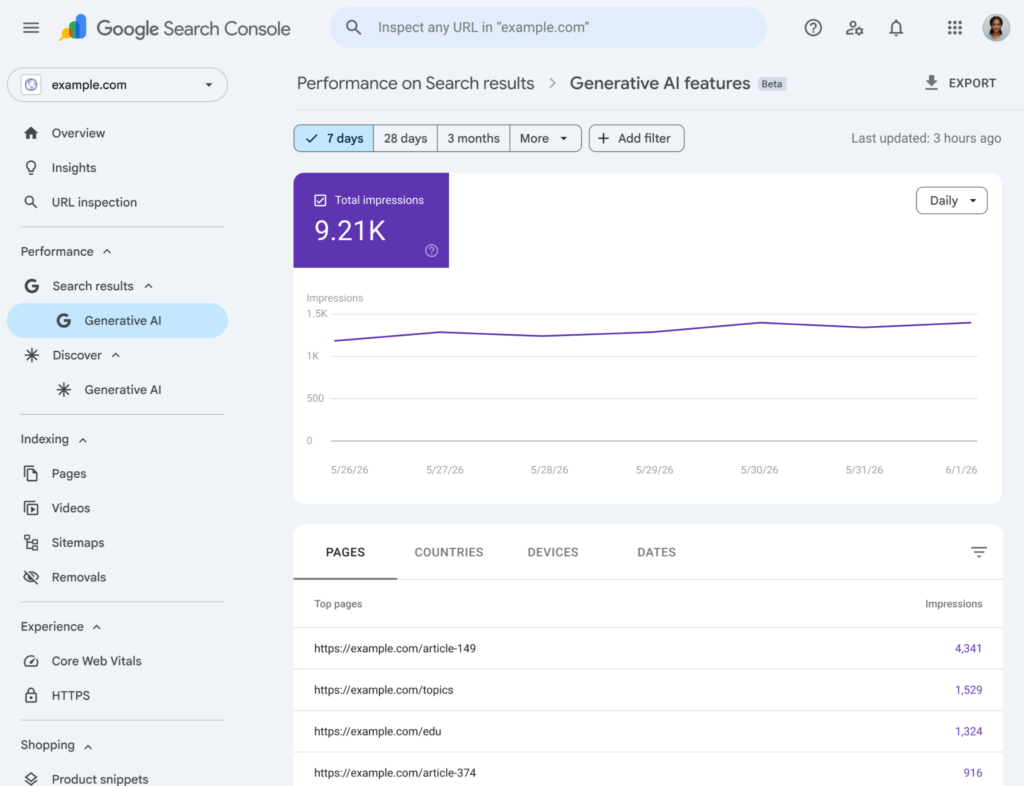
The upcoming report is designed to give us a clear overview of how individual URLs perform when selected by Generative AI Search. The data Google is unlocking (for now) consists of five core metrics:
- Impressions: How many times a URL from your site was cited or appeared as part of an AI-generated answer.
- Pages: The specific URLs that Google’s AI algorithm deemed valuable enough to pull into its responses.
- Countries: Insights into where the users seeing your content via AI answers are located.
- Devices: A breakdown of desktop vs. mobile performance to see which platform drives more AI visibility.
- Dates: Performance over time, allowing you to track if recent content optimizations are helping your AI adoption rate.
However, there is a major plot twist that has SEOs scratching their heads. Reports from Search Engine Land confirm that in this initial testing phase, “Click data is entirely missing.” You read that right. Google does not currently show how many times a user clicked on an AI Link Card or citation to visit your site. This is a massive pain point for digital marketers because impressions only prove “Visibility.” They don’t tell us if that visibility is actually translating into traffic, or if the AI is simply scraping our data for free without giving anything back.
Why is Google Withholding Click Data?
From a technical and data-tracking standpoint, tracking user behavior in an AI-driven search ecosystem is incredibly complex. This is especially true in AI Mode, where users engage in multi-turn conversations and ask follow-up questions. Within a single chat session, the AI might display links in various formats: side-panel Link Cards, horizontal carousels, image blocks, or inline citations text.
Tracking exactly which link was clicked, at what point in the conversation, and under what specific context is a massive hurdle. Because of this, SEOs in 2026 must shift their mindset. Instead of obsessing solely over “Keyword Rank #1,” we need to start measuring “AI Share of Voice”—ensuring our brand and content occupy the AI answer space. Even if a user doesn’t click through immediately, having your brand cited builds authority and awareness in an era where search habits are fundamentally changing.
The AI Blocking Toggle: Self-Sabotage or a Smart Strategic Move?
The most debated feature is undoubtedly the new control toggle in GSC, which gives webmasters the option to opt-out of having their content displayed in AI Overviews, AI Mode, and AI Overviews within the Discover feed.
Google has explicitly stated that “opting out of generative AI features will not be used as a ranking signal for core web search.” This means that if you choose to block the AI from using your site to generate answers, your traditional organic rankings (Organic Search) should theoretically remain unaffected.
This brings up the ultimate question: “Should we keep it on, or turn it off?”
There is no one-size-fits-all answer, and it is highly recommended not to panic-disable it without data. Let’s look at it from two different strategic angles:
- The Case for “Opting Out”: If you run a breaking news site, a digital publisher, or a blog that relies 100% on display ad revenue (like AdSense) tied directly to pageviews, you might want to consider blocking the AI. For short-form informational content or quick definitions, once the AI summarizes the answer on the main page, the user’s journey ends. Blocking the AI forces users to click through to read the details, protecting your business model.
- The Case for “Opting In”: If you operate an e-commerce platform, a B2B service site, a corporate blog, or represent a brand looking to establish authority, having Google’s AI select your content is the ultimate stamp of approval. It tells the user that your site is the trusted source, which builds brand confidence and can lead to conversions down the line.
Therefore, the safest path forward for most websites is to stay calm and wait for the data. Once the AI performance report becomes available in your region, analyze which pages and topics are gaining traction via AI. Evaluate the pros and cons on a page-by-page or folder-by-folder basis rather than completely shutting off your site’s AI visibility.
How to Build a Modern SEO Strategy That AI Algorithms Love
For those worried that they need to completely rebuild their websites from scratch—don’t worry. Google’s Search Central documentation explicitly emphasizes that “traditional SEO fundamentals still apply to AI features.” You do not need to implement any secret Schema markup or create custom backend structures just to satisfy AI Overviews. Make sure your site excels at the basics:
- Crawlability & Indexability: Ensure Googlebots can easily access and index your pages without technical roadblocks.
- Text-Based Content: Keep your primary insights, data, and deep dives in an indexable text format rather than hiding them entirely inside images or videos.
- Smart Internal Linking: Build a logical internal link structure to help the AI understand the context and topical authority of your site.
- Page Experience & Structured Data: Maintain fast loading speeds, a mobile-friendly layout, and clean structured data (Product, Article, LocalBusiness Schema) that matches what users actually see on the page.
The real differentiator you need to inject into your strategy moving forward is AEO (Answer Engine Optimization). Generic, surface-level content that looks exactly like every other site on the web will easily be synthesized and replaced by AI.
To win AI citations, your content must offer Unique Value. This means prioritizing first-hand experience, expert analysis, detailed pros-and-cons comparison tables, real-world case studies, or deep local insights. Highly structured, deeply analytical, and original raw data is exactly what AI search engines are looking for to make their own generated answers complete.
Controlling Content the Old-School Way: Understanding Snippet Controls
Aside from the new GSC toggle currently in testing, remember that webmasters have always had access to traditional robots meta tags to restrict how Google previews their data. These include:
nosnippet: Prevents Google from showing a text snippet or video preview for your page altogether, which effectively keeps it out of AI features.max-snippet:[number]: Specifies a maximum character length for the text snippet Google can extract.data-nosnippet: A highly useful tag that allows you to shield specific sections or paragraphs of a webpage from being used as a preview snippet.noindex: Prevents the page from being indexed entirely. Use this with extreme caution, as it will completely remove your page from traditional organic search results, not just AI features.
It is also vital not to confuse these search display controls with Google-Extended. The Google-Extended token is designed specifically to block Google from using your content to train its AI models (like Gemini). It does not control how your site is displayed on Google Search. Make sure you differentiate between “allowing a bot to crawl your site for search visibility” and “allowing a bot to use your site for AI training” so you can deploy the right tool for your specific business goals.
Final Thoughts: Entering a New Era of Search
Google’s latest move signals a definitive transition into a new frontier for SEO. Tools like Google Search Console are evolving from simple traffic dashboards into strategic command centers that show how well a brand is “positioned in an AI-dominated ecosystem.”
The objective right now isn’t to react out of fear and block everything, but rather to double down on content quality. Step away from low-value, repetitive content, monitor your Search Console data closely, and strategically decide which parts of your site should remain open to drive brand visibility and which parts should be protected to preserve content value. Adapt incrementally, and your site will thrive in this new age of AI Search.
FAQ
1. How does the new AI Performance Report in Google Search Console differ from the traditional Performance Report?
The traditional Performance Report tracks metrics driven by standard organic blue links (Traditional Organic Search). In contrast, the new AI Performance Report isolates data specifically from instances where your website’s URLs are selected, synthesized, and cited within Google’s generative AI features, such as AI Overviews or AI Mode. While it provides invaluable insight into your brand’s visibility within AI responses via Impression data, it does not display click-through data (Clicks) in its current testing version.
2. If I use the new toggle to opt-out of AI Search features, will it negatively impact my traditional Google rankings?
According to official statements from Google, choosing to opt-out of generative AI search features will not be used as a ranking signal for traditional organic web search. Your classic organic desktop and mobile rankings will not drop as a penalty for turning the toggle off. However, opting out means your content will be completely excluded from AI-generated answer boxes, meaning you will completely give up any potential impressions, visibility, or secondary traffic originating from users who rely on AI search features.
3. Besides the new Search Console toggle, how can I use traditional Snippet Controls to manage AI Overviews?
You can use standard Robots Meta Tags to fine-tune how Google interacts with your content. For example, if you want to prevent a specific paragraph from being scraped by the AI while keeping the rest of the page open, you can wrap that text in a data-nosnippet tag. If you want to block a page from being used for snippets across the board, you can use the nosnippet tag or limit it via max-snippet. Be careful with the noindex tag, as it removes your page from the entire Google index completely, not just from AI features.